
RAG Is Not Enough: Introducing PolyRAG by Phronetic AI

Not just RAG. A complete framework for building intelligent information systems that unify retrieval, memory, and reasoning.
What is PolyRAG?
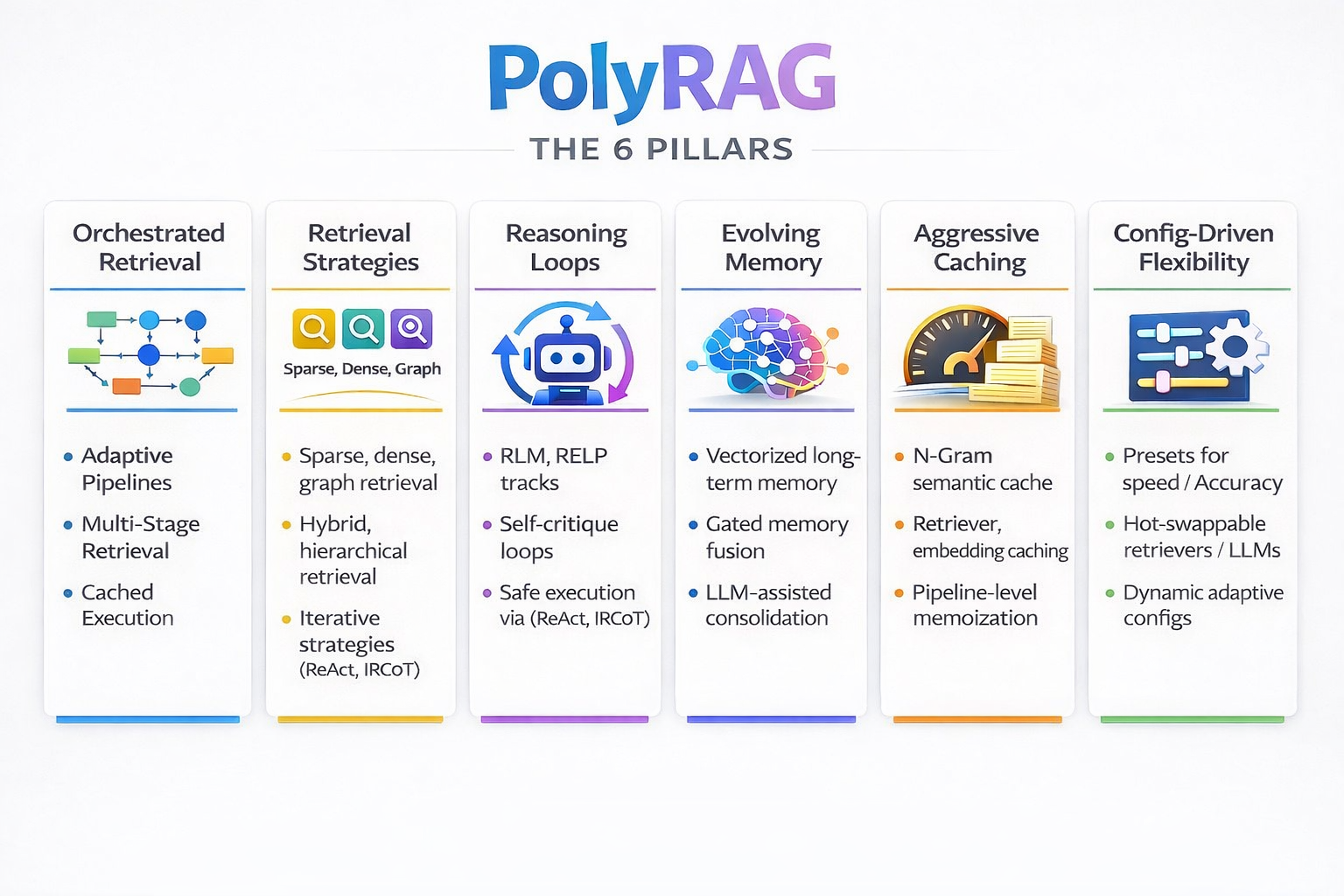
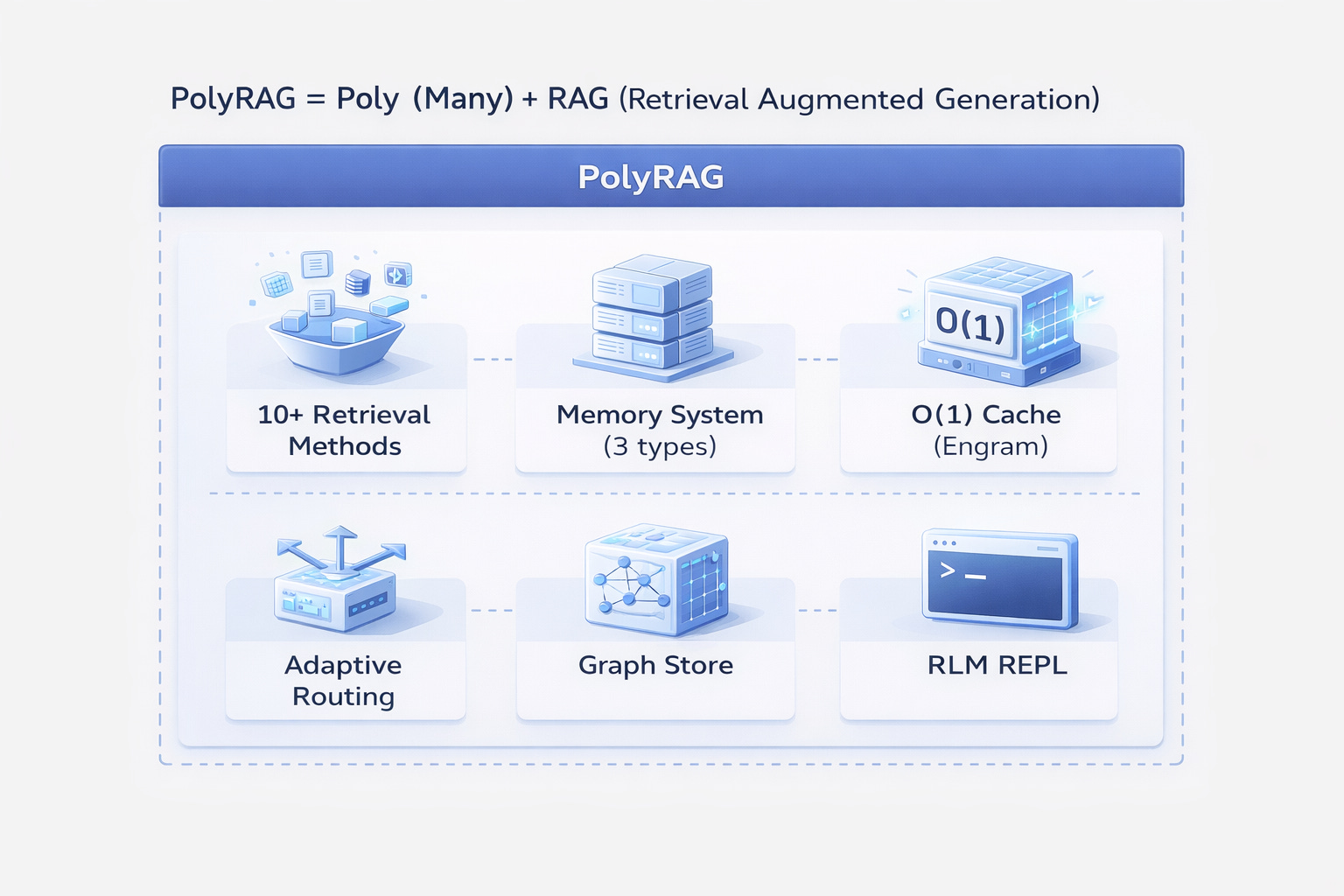
PolyRAG is more than a RAG system. It’s a comprehensive framework that combines:
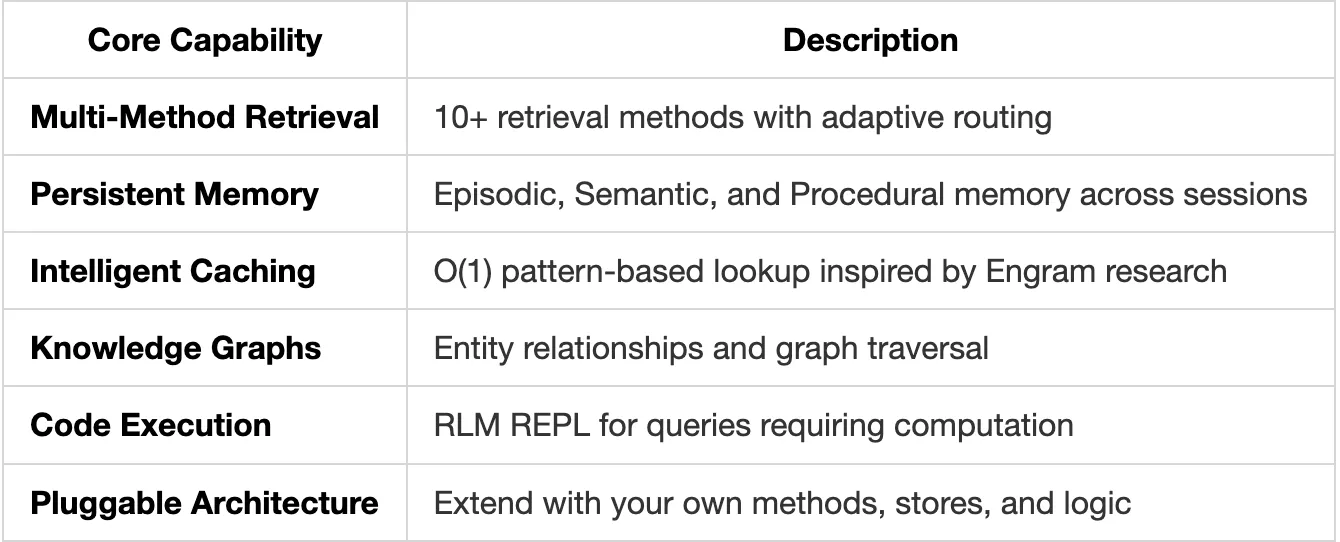
PolyRAG = Poly (Many) approaches unified into one extensible system
The Problem: Why Traditional Systems Fail
The Reality of Production Information Systems
Most tutorials make it look simple: chunk documents, create embeddings, search, done. But when you deploy to production with real users and real queries, reality hits hard.
The core issue: Traditional RAG treats every problem as a retrieval problem. But real-world information needs are diverse, some need retrieval, some need memory, some need reasoning, some need relationships.
Real failure scenarios we’ve encountered:
User: "What was our Q3 revenue compared to Q2?"
RAG Response: "The company reported strong quarterly performance..."

User: "List all safety protocols for chemical handling"
RAG Response: Returns 3 of 12 protocols, missing critical ones

User: "How does the new policy affect employees hired before 2020?"
RAG Response: Retrieves the policy but misses the grandfathering clause
The Five Fatal Flaws
1. Single-Method Blindness
Traditional RAG uses ONE retrieval method. But queries are diverse:
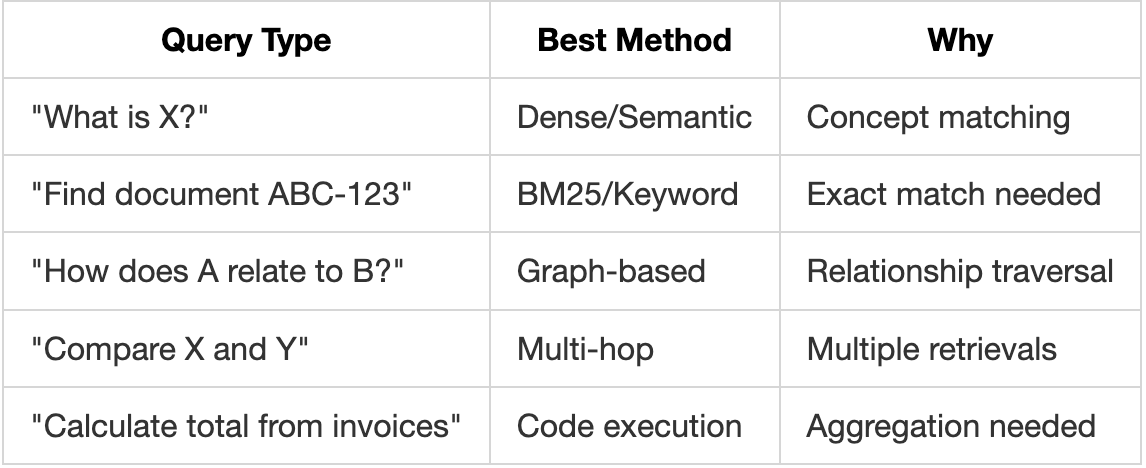
Using one method for all queries is like using a hammer for every task.
2. Context Fragmentation
Standard chunking destroys context:
Original Document:
"Section 5.2: Safety Requirements
All personnel must complete Form A-7 before entering Zone 3.
This requirement was established following the 2019 incident
described in Section 2.1..."

After Chunking:
Chunk 1: "Section 5.2: Safety Requirements. All personnel must..."
Chunk 2: "...complete Form A-7 before entering Zone 3. This..."
Chunk 3: "...requirement was established following the 2019..."

Query: "What form is needed for Zone 3 and why?"
Retrieved: Chunk 2 (has the form) but MISSING the reason (Chunk 3)
3. No Memory Between Sessions
Every conversation starts fresh:
Session 1: User asks about Python best practices
Session 2: User asks "How do I do that thing we discussed?"
RAG: "I don't have context about previous discussions"
4. Embedding Computation Overhead
Real costs at scale:
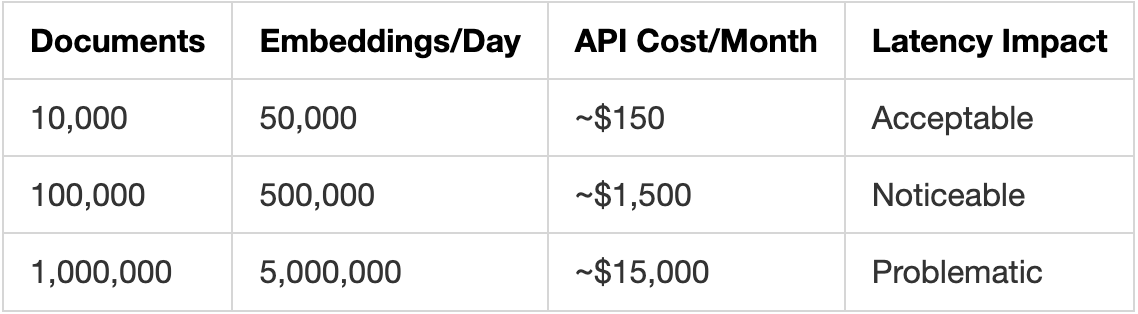
Repeated queries recompute embeddings every time.
5. Inability to Reason
RAG retrieves. It doesn’t think.
Query: "What's the total value of all contracts signed in 2023?"

What RAG does: Returns chunks mentioning "contracts" and "2023"
What's needed: Retrieve all contracts → Extract values → Sum them

Query: "Which department has the highest budget increase?"

What RAG does: Returns budget-related chunks
What's needed: Retrieve all budgets → Compare → Identify maximum
The Severity
These aren’t edge cases. In production:
- 40-60% of queries need more than simple semantic search
- Memory-less systems frustrate users, causing repeated explanations
- Wrong retrievals in legal/medical domains have serious consequences
- Latency spikes during peak usage hurt user experience
- Costs compound as usage grows
The Solution: PolyRAG
PolyRAG addresses these problems by combining multiple approaches:
What Makes PolyRAG Different
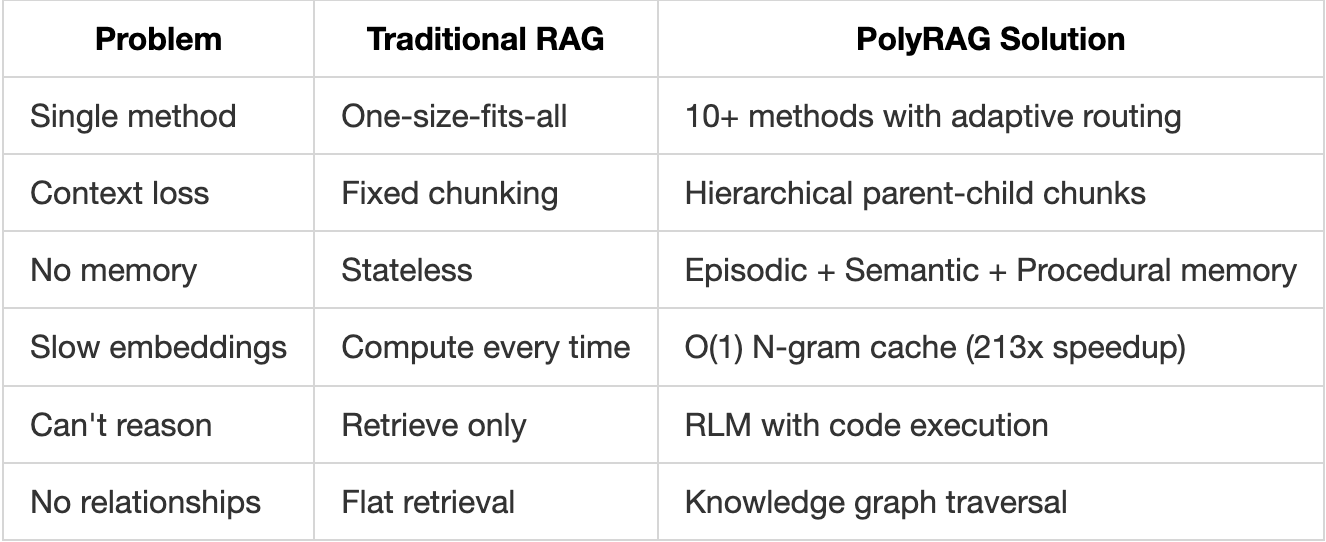
Core Principles
- Right Tool for the Job: Automatically select the best retrieval method
- Preserve Context: Hierarchical chunking maintains document structure
- Remember Everything: Persistent memory across sessions
- Cache Aggressively: Never compute the same embedding twice
- Reason When Needed: Execute code for complex queries
- Understand Relationships: Graph-based entity connections
Understanding RAG Fundamentals
Before diving into PolyRAG’s advanced features, let’s ensure we understand the basics.
What is RAG?
Retrieval Augmented Generation (RAG) enhances LLM responses by providing relevant context from your documents.
Without RAG:
User: "What's our refund policy?"
LLM: "I don't have information about your specific refund policy."

With RAG:
User: "What's our refund policy?"
[RAG retrieves: "Refunds are available within 30 days of purchase..."]
LLM: "Your refund policy allows returns within 30 days of purchase..."
The RAG Pipeline
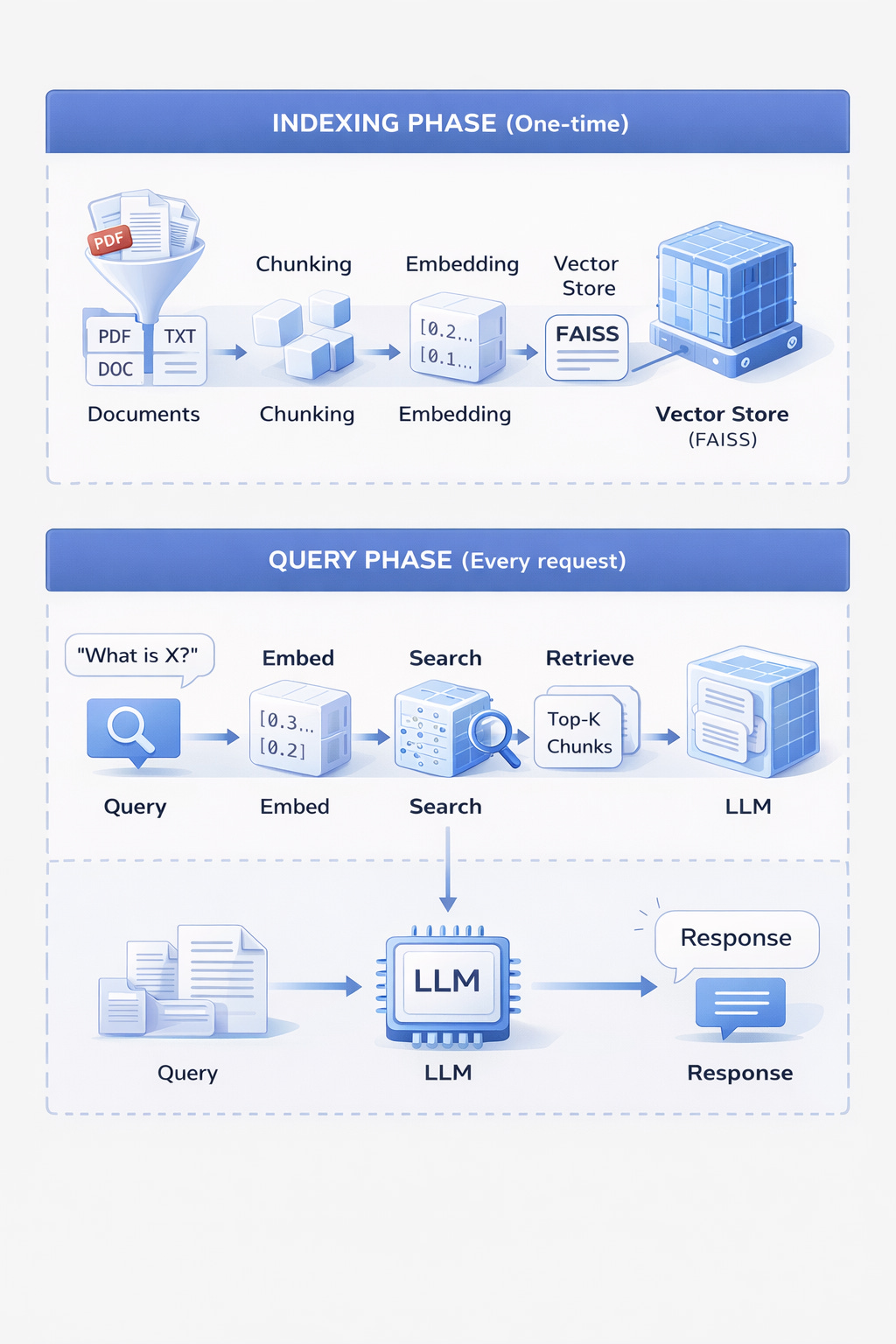
Why Retrieval Matters
The quality of retrieved context directly impacts response quality:
# Poor retrieval = Poor response
retrieved = ["The company was founded in 1995..."]  # Irrelevant
response = "The company was founded in 1995."  # Wrong answer

# Good retrieval = Good response
retrieved = ["Refunds are processed within 5-7 business days..."]  # Relevant
response = "Refunds typically take 5-7 business days to process."  # Correct
How Embeddings Work
Embeddings are the foundation of semantic search. Understanding them is crucial.
What is an Embedding?
An embedding converts text into a numerical vector that captures its meaning.
Text: "The cat sat on the mat"
      ↓
Embedding Model
      ↓
Vector: [0.23, -0.45, 0.12, 0.89, ..., 0.34]  (384 or 768 dimensions)
Why Vectors?
Vectors allow mathematical comparison of meaning:
"happy" → [0.8, 0.2, 0.1]
"joyful" → [0.75, 0.25, 0.15]  ← Similar vectors (similar meaning)
"sad" → [-0.7, 0.3, 0.2]       ← Different vector (opposite meaning)

Similarity("happy", "joyful") = 0.95  (high)
Similarity("happy", "sad") = 0.12     (low)
Practical Example
from polyrag.embeddings import LocalEmbeddingProvider

# Initialize embedding provider
provider = LocalEmbeddingProvider(model="sentence-transformers/all-MiniLM-L6-v2")

# Create embeddings
text1 = "How do I reset my password?"
text2 = "I forgot my login credentials"
text3 = "What's the weather today?"

emb1 = provider.encode(text1)  # Shape: (384,)
emb2 = provider.encode(text2)  # Shape: (384,)
emb3 = provider.encode(text3)  # Shape: (384,)

# Calculate similarities
import numpy as np

def cosine_similarity(a, b):
    return np.dot(a, b) / (np.linalg.norm(a) * np.linalg.norm(b))

print(cosine_similarity(emb1, emb2))  # ~0.82 (similar - both about login)
print(cosine_similarity(emb1, emb3))  # ~0.15 (different topics)
Embedding Dimensions
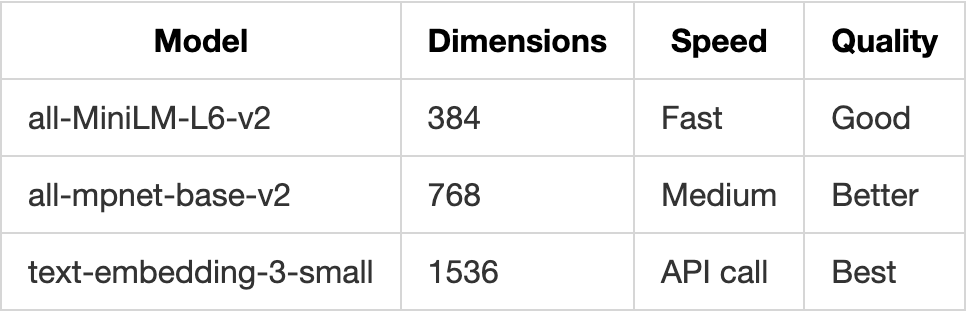
PolyRAG supports all major embedding providers:
- Local (SentenceTransformers)
- OpenAI
- Cohere
- Custom providers
The Query Journey
Let’s trace a query through PolyRAG step by step.
Step 1: Query Analysis
query = "Compare the safety protocols in Building A vs Building B"

# PolyRAG analyses the query
analysis = {
    "query_type": "comparison",      # Comparing two things
    "complexity": "multi_hop",       # Needs multiple retrievals
    "entities": ["Building A", "Building B", "safety protocols"],
    "recommended_method": "decompose"  # Break into sub-queries
}
Step 2: Method Selection
Based on analysis, PolyRAG selects the optimal retrieval method:
Query Type      →  Method Selected
─────────────────────────────────────
"What is X?"    →  Dense (semantic)
"Find doc #123" →  BM25 (keyword)
"Compare A & B" →  Decompose (multi-retrieval)
"How A affects B" → Graph (relationships)
"Calculate total" → RLM REPL (code execution)
Step 3: Retrieval Execution
For our comparison query:
# Decomposed into sub-queries:
sub_query_1 = "Safety protocols for Building A"
sub_query_2 = "Safety protocols for Building B"

# Each sub-query retrieves relevant chunks
results_a = retriever.retrieve(sub_query_1, top_k=5)
results_b = retriever.retrieve(sub_query_2, top_k=5)

# Results are merged and deduplicated
final_results = merge_and_rank(results_a, results_b)
Step 4: Context Assembly
# Retrieved chunks are assembled into context
context = """
Building A Safety Protocols:
- Fire evacuation route through East exit
- Chemical storage in Room A-101
- Emergency contact: x4500

Building B Safety Protocols:
- Fire evacuation route through West exit
- Chemical storage in Room B-205
- Emergency contact: x4501
"""
Step 5: Response Generation
# Context + Query sent to LLM
prompt = f"""
Based on the following information:
{context}

Answer: {query}
"""

response = llm.generate(prompt)
# "Building A and Building B have similar safety protocols with key differences:
#  1. Evacuation routes: A uses East exit, B uses West exit
#  2. Chemical storage: A in Room A-101, B in Room B-205
#  3. Emergency contacts differ: A is x4500, B is x4501"
Complete Flow Diagram
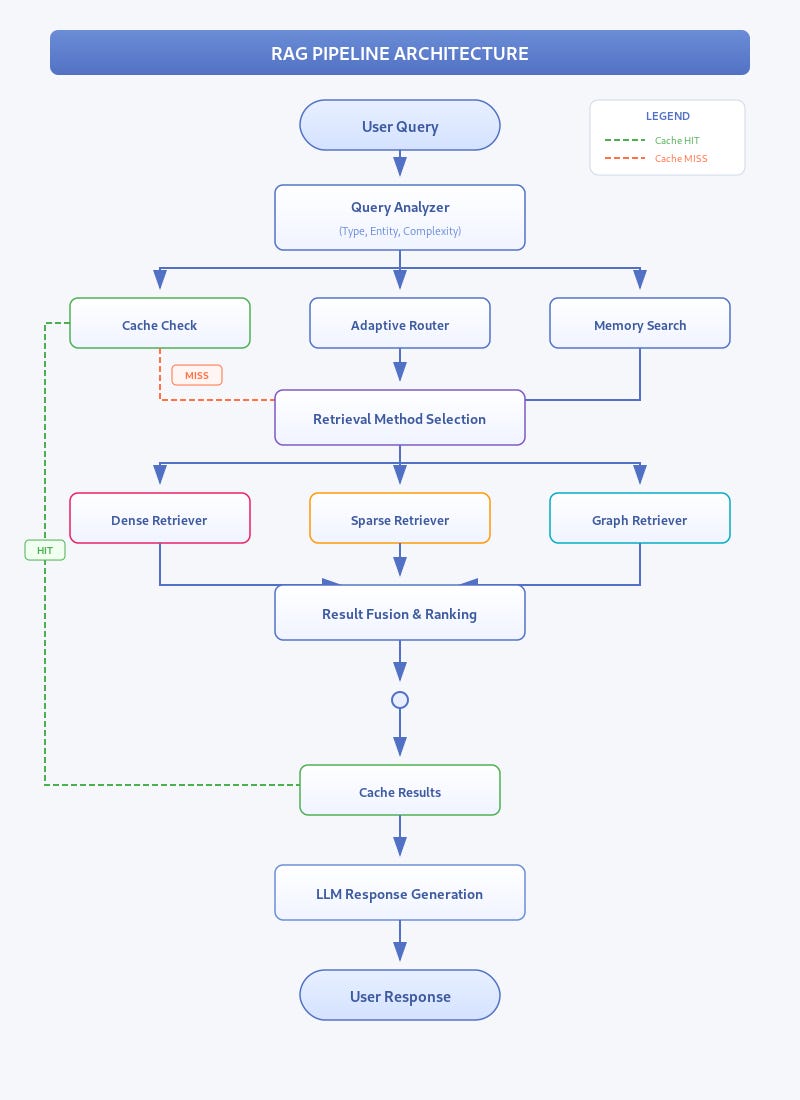
PolyRAG Architecture
System Overview
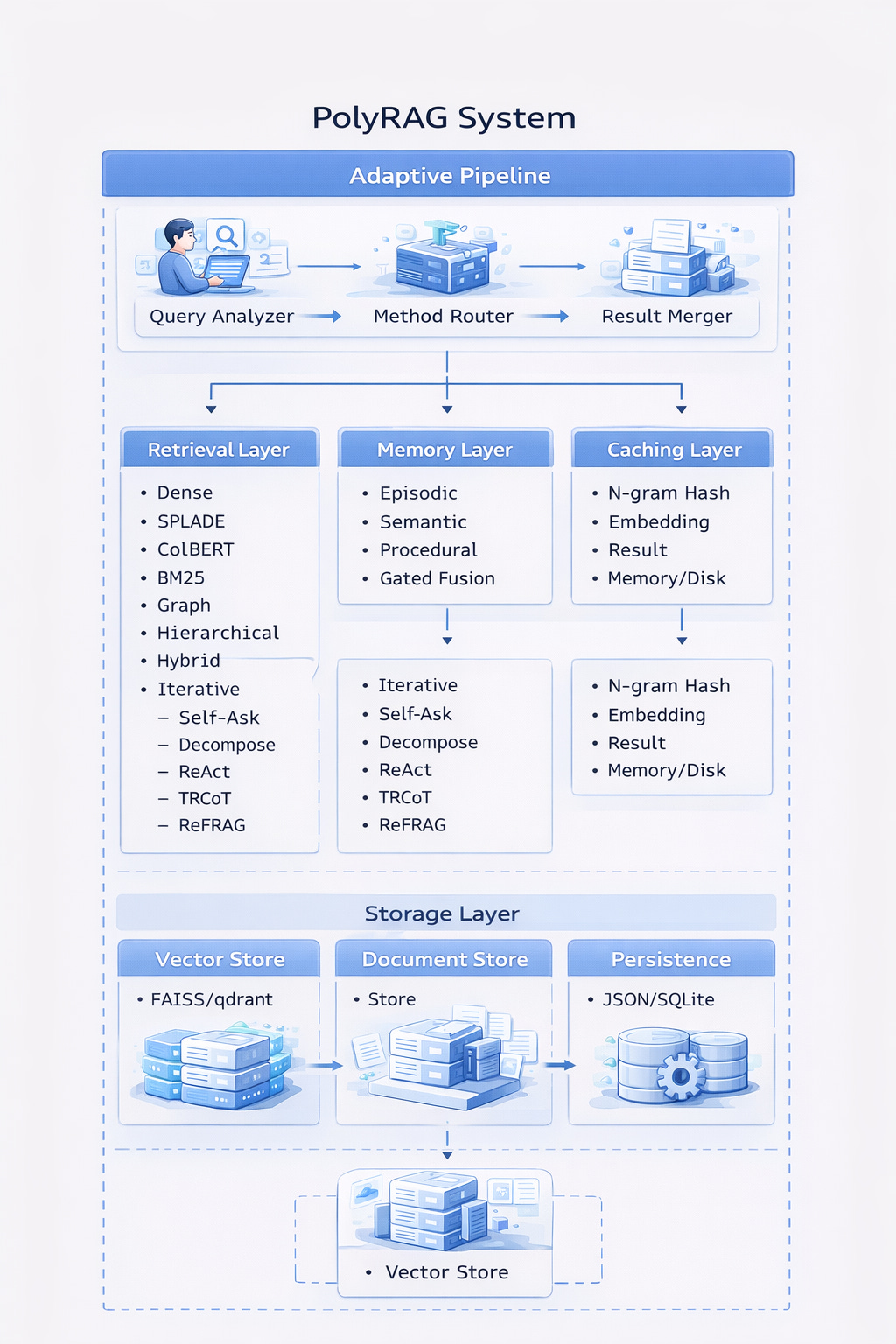
Core Components
1. Adaptive Pipeline
The brain of PolyRAG that orchestrates everything:
from polyrag import AdaptivePipeline, Document

# Initialize
pipeline = AdaptivePipeline()

# Index documents
documents = [
    Document(content="...", document_id="doc1"),
    Document(content="...", document_id="doc2"),
]
pipeline.index(documents)

# Query - method auto-selected
result = pipeline.query("What is the refund policy?")
print(f"Method used: {result.retrieval_method}")
print(f"Results: {len(result.scored_chunks)}")
2. Retrieval Layer
10+ methods for different query types:
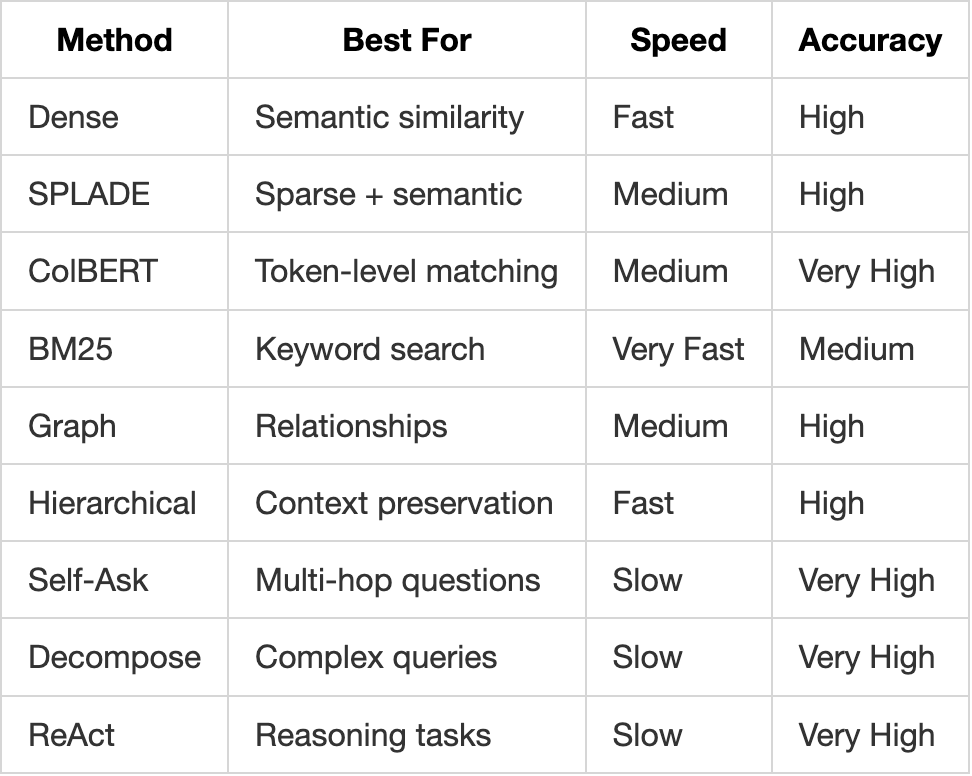
3. Memory Layer
Persistent knowledge across sessions:
from polyrag.memory import MemoryManager

memory = MemoryManager(user_id="user_123")

# Store memories
memory.add("User prefers Python examples", memory_type="semantic")
memory.add("User asked about RAG yesterday", memory_type="episodic")
memory.add("Always include code samples", memory_type="procedural")

# Search memories
results = memory.search("programming preferences")
4. Caching Layer
O(1) lookup inspired by Engram:
from polyrag.cache import NgramCache

cache = NgramCache(config={"backend": "memory", "max_size": 10000})

# Cache embeddings
embedding = cache.get_or_compute("query text", embed_function)
# First call: computes embedding
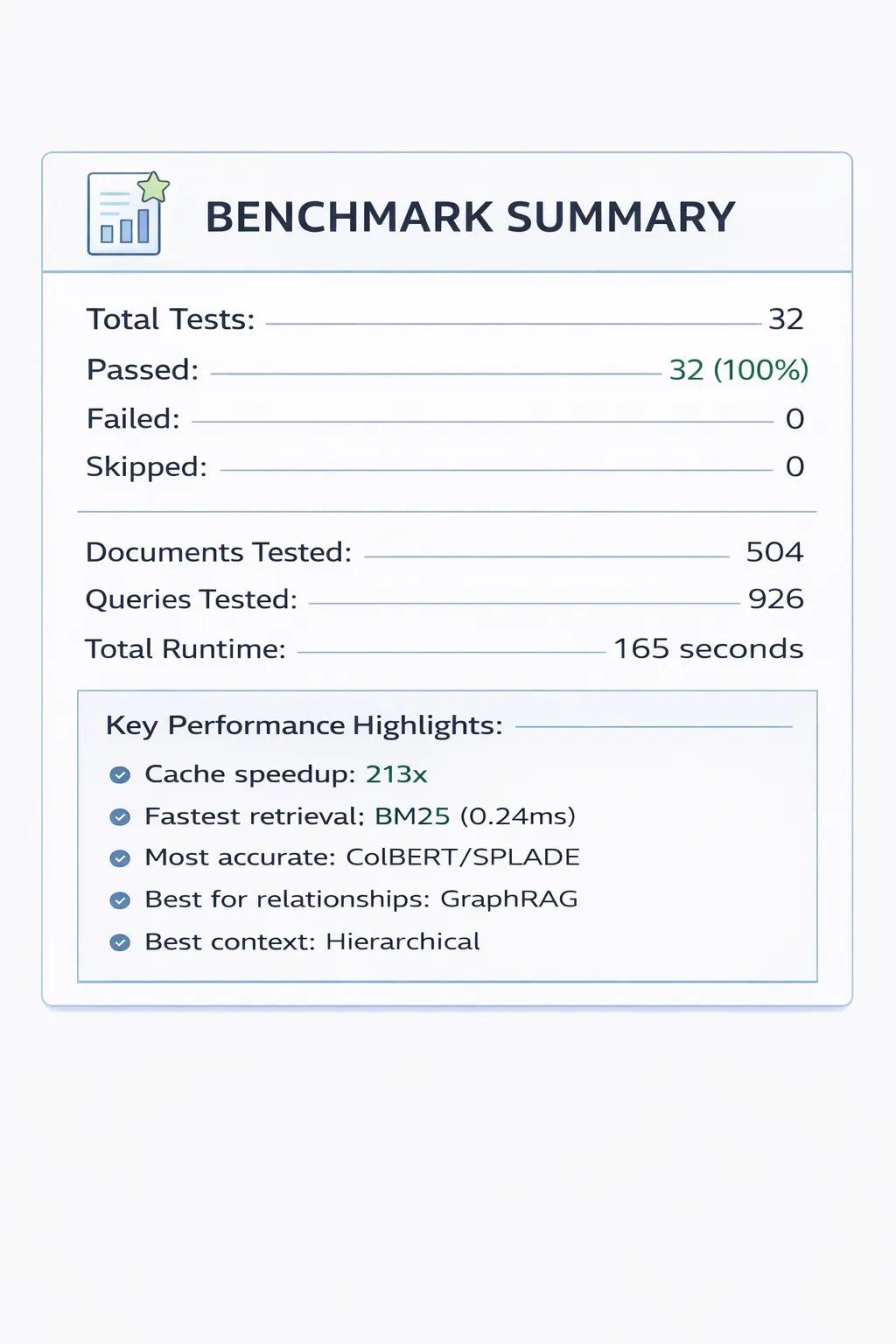
# Second call: returns cached (213x faster)
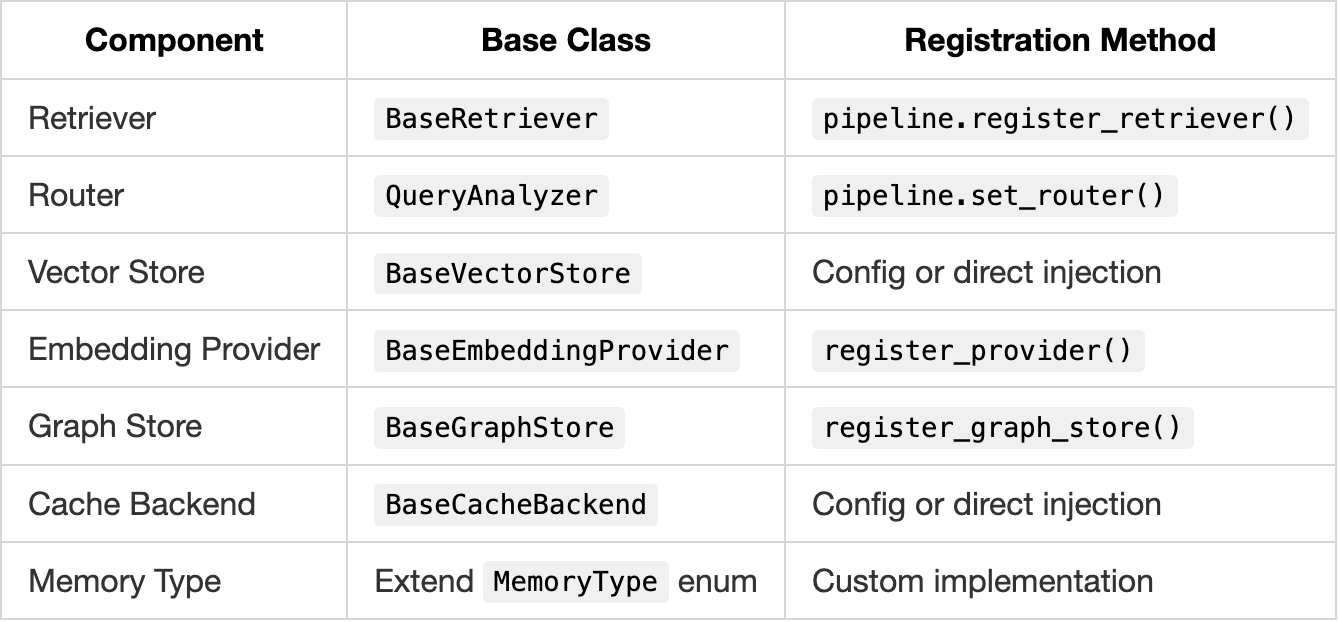
Pluggable Architecture & Extensibility
PolyRAG is designed as an open, extensible framework. Every component can be replaced, extended, or customised. This section explains how to add your own methods, stores, and logic.
Design Philosophy
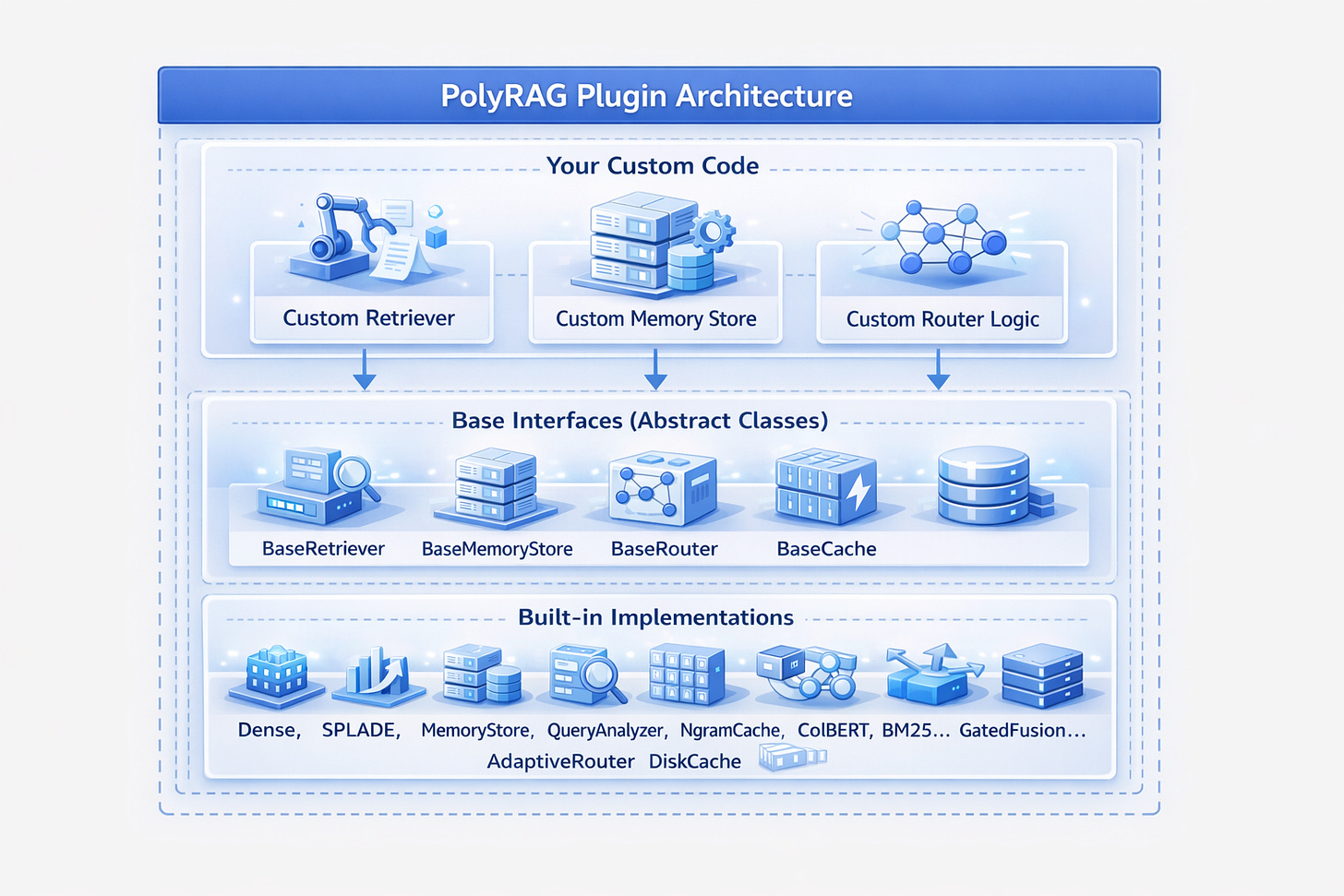
Adding a Custom Retriever
Every retriever extends BaseRetriever. Here’s how to create your own:
from polyrag.core.retriever import BaseRetriever, RetrievalResult
from polyrag.core.document import Document, Chunk, ScoredChunk

class MyCustomRetriever(BaseRetriever):
    """Your custom retrieval logic."""

    def __init__(self, config=None):
        super().__init__(config)
        self._indexed = False
        self._chunks = []
        # Initialize your custom components

    def index(self, documents: List[Document]) -> None:
        """Index documents with your method."""
        self._chunks = []

        for doc in documents:
            # Your chunking logic (or use built-in)
            chunks = self._chunk_document(doc)
            self._chunks.extend(chunks)

        # Your indexing logic
        self._build_custom_index(self._chunks)
        self._indexed = True

    def retrieve(self, query: str, top_k: int = 10) -> RetrievalResult:
        """Retrieve using your custom method."""
        if not self._indexed:
            raise ValueError("Must call index() first")

        # Your retrieval logic
        results = self._custom_search(query, top_k)

        scored_chunks = [
            ScoredChunk(
                chunk=chunk,
                score=score,
                retrieval_method="my_custom_method"
            )
            for chunk, score in results
        ]

        return RetrievalResult(
            scored_chunks=scored_chunks,
            query=query,
            retrieval_method="my_custom_method"
        )

    def _build_custom_index(self, chunks):
        """Your indexing implementation."""
        pass

    def _custom_search(self, query, top_k):
        """Your search implementation."""
        pass
Registering Custom Retrievers with the Router
The adaptive router can use your custom retriever:
from polyrag.core.adaptive_pipeline import AdaptivePipeline
from polyrag.routing.query_analyser import QueryAnalyser

# Create pipeline
pipeline = AdaptivePipeline()

# Register your custom retriever
pipeline.register_retriever("my_method", MyCustomRetriever())

# Configure routing to use your method
pipeline.configure_routing({
    "my_method": {
        "query_types": ["technical", "domain_specific"],
        "complexity_threshold": 0.5,
        "weight": 1.2  # Higher weight = preferred
    }
})

# Now queries matching your criteria use your method
result = pipeline.query("technical domain query")
print(result.retrieval_method)  # "my_method" if matched
Custom Query Router
Replace or extend the query analysis and routing logic:
from polyrag.routing.query_analyser import QueryAnalyser, QueryAnalysis

class MyCustomRouter(QueryAnalyser):
    """Custom routing logic for your domain."""

    def __init__(self, config=None):
        super().__init__(config)
        # Add domain-specific patterns
        self.domain_patterns = {
            "legal": ["section", "clause", "statute", "regulation"],
            "medical": ["diagnosis", "treatment", "symptom", "patient"],
            "financial": ["revenue", "profit", "quarter", "fiscal"],
        }

    def analyse(self, query: str) -> QueryAnalysis:
        """Analyse query with domain awareness."""
        # Get base analysis
        base_analysis = super().analyse(query)

        # Add domain detection
        domain = self._detect_domain(query)

        # Override method selection based on domain
        if domain == "legal":
            base_analysis.recommended_method = "bm25"  # Exact terms matter
        elif domain == "medical":
            base_analysis.recommended_method = "dense"  # Semantic understanding
        elif domain == "financial":
            base_analysis.recommended_method = "rlm_repl"  # Calculations needed

        return base_analysis

    def _detect_domain(self, query: str) -> str:
        query_lower = query.lower()
        for domain, patterns in self.domain_patterns.items():
            if any(p in query_lower for p in patterns):
                return domain
        return "general"

# Use custom router
pipeline = AdaptivePipeline()
pipeline.set_router(MyCustomRouter())
Custom Memory Backend
Implement your own memory storage:
from polyrag.memory.vector_stores import BaseVectorStore

class MyCustomVectorStore(BaseVectorStore):
    """Custom vector store (e.g., for a specific database)."""

    def __init__(self, config=None):
        self.config = config or {}
        # Initialize your storage
        self._connect_to_database()

    def add(self, ids: List[str], embeddings: np.ndarray,
            metadata: Optional[List[dict]] = None) -> None:
        """Add vectors to your store."""
        for i, (id_, emb) in enumerate(zip(ids, embeddings)):
            meta = metadata[i] if metadata else {}
            self._insert_to_database(id_, emb.tolist(), meta)

    def search(self, query_embedding: np.ndarray, top_k: int = 10,
               filter_dict: Optional[dict] = None) -> Tuple[List[str], List[float], List[dict]]:
        """Search your store."""
        results = self._database_vector_search(
            query_embedding.tolist(),
            top_k,
            filter_dict
        )

        ids = [r["id"] for r in results]
        scores = [r["score"] for r in results]
        metadata = [r["metadata"] for r in results]

        return ids, scores, metadata

    def delete(self, ids: List[str]) -> None:
        """Delete from your store."""
        self._delete_from_database(ids)

    def clear(self) -> None:
        """Clear your store."""
        self._clear_database()

# Register with MemoryStore
from polyrag.memory import MemoryStore

store = MemoryStore(config={
    "vector_store": {"type": "custom"},
    "custom_vector_store": MyCustomVectorStore(config={...})
})
Custom Embedding Provider
Add support for a new embedding service:
from polyrag.embeddings.base_provider import BaseEmbeddingProvider

class MyEmbeddingProvider(BaseEmbeddingProvider):
    """Custom embedding provider (e.g., your internal model)."""

    def __init__(self, config=None):
        self.config = config or {}
        self.model = self._load_model()
        self._dimension = self.config.get("dimension", 768)

    def encode(self, text: str) -> np.ndarray:
        """Encode single text."""
        return self.model.encode(text)

    def encode_batch(self, texts: List[str]) -> np.ndarray:
        """Encode batch of texts."""
        return np.array([self.encode(t) for t in texts])

    def get_dimension(self) -> int:
        """Return embedding dimension."""
        return self._dimension

    def get_provider_type(self) -> str:
        """Return provider identifier."""
        return "my_custom_provider"

    def _load_model(self):
        """Load your custom model."""
        pass

# Register with factory
from polyrag.embeddings.provider_factory import register_provider

register_provider("my_provider", MyEmbeddingProvider)

# Use it
from polyrag.embeddings import create_provider
provider = create_provider("my_provider", {"dimension": 768})
Custom Graph Store
Implement your own graph backend:
from polyrag.graph.graph_store import BaseGraphStore, GraphNode, GraphEdge

class MyGraphStore(BaseGraphStore):
    """Custom graph store (e.g., for a specific graph database)."""

    def __init__(self, config=None):
        self.config = config or {}
        self._connect_to_graph_db()

    def add_node(self, node: GraphNode) -> bool:
        """Add node to graph."""
        return self._db_add_node(node.to_dict())

    def add_edge(self, edge: GraphEdge) -> bool:
        """Add edge to graph."""
        return self._db_add_edge(edge.to_dict())

    def get_neighbors(self, node_id: str, direction: str = "both",
                      relation: Optional[str] = None) -> List[GraphNode]:
        """Get neighboring nodes."""
        return self._db_query_neighbors(node_id, direction, relation)

    def find_paths(self, source_id: str, target_id: str,
                   max_length: int = 5) -> List[List[str]]:
        """Find paths between nodes."""
        return self._db_find_paths(source_id, target_id, max_length)

    # ... implement other methods

# Register with factory
from polyrag.graph.graph_store import register_graph_store

register_graph_store("my_graph_db", MyGraphStore)
Plugin Discovery (Future)
PolyRAG supports automatic plugin discovery:
polyrag_plugins/
├── my_retriever/
│   ├── __init__.py
│   └── retriever.py      # Exports MyCustomRetriever
├── my_embedding/
│   ├── __init__.py
│   └── provider.py       # Exports MyEmbeddingProvider
└── my_router/
    ├── __init__.py
    └── router.py         # Exports MyCustomRouter
# polyrag_plugins/my_retriever/__init__.py
from .retriever import MyCustomRetriever

POLYRAG_PLUGIN = {
    "type": "retriever",
    "name": "my_custom",
    "class": MyCustomRetriever
}
Extension Points Summary
Best Practices for Extensions
- Follow the interface: Implement all abstract methods
- Handle errors gracefully: Return empty results rather than crashing
- Log appropriately: Use the
logurulogger for consistency - Test thoroughly: Add tests for your custom components
- Document: Include docstrings and usage examples
- Configure: Accept config dicts for flexibility
# Good pattern for custom components
class MyComponent:
    def __init__(self, config=None):
        self.config = config or {}

        # Use config with defaults
        self.param1 = self.config.get("param1", "default_value")
        self.param2 = self.config.get("param2", 100)

        # Initialize with logging
        from loguru import logger
        logger.info(f"MyComponent initialized with param1={self.param1}")
Retrieval Methods
1. Dense Retrieval (Semantic Search)
What it is: Converts text to vectors and finds similar vectors.
Best for: Conceptual queries, paraphrased questions.
How it works:
Query: "How do I get my money back?"
        ↓ embedding
    [0.2, 0.8, 0.1, ...]
        ↓ similarity search
Matches: "Refund Policy: To request a refund..."
         (even though "refund" ≠ "money back")
Usage:
from polyrag.retrievers import DenseRetriever

retriever = DenseRetriever(config={
    "embedding_model": "sentence-transformers/all-MiniLM-L6-v2",
    "top_k": 10
})
retriever.index(documents)
results = retriever.retrieve("How do I get my money back?")
Test Results:
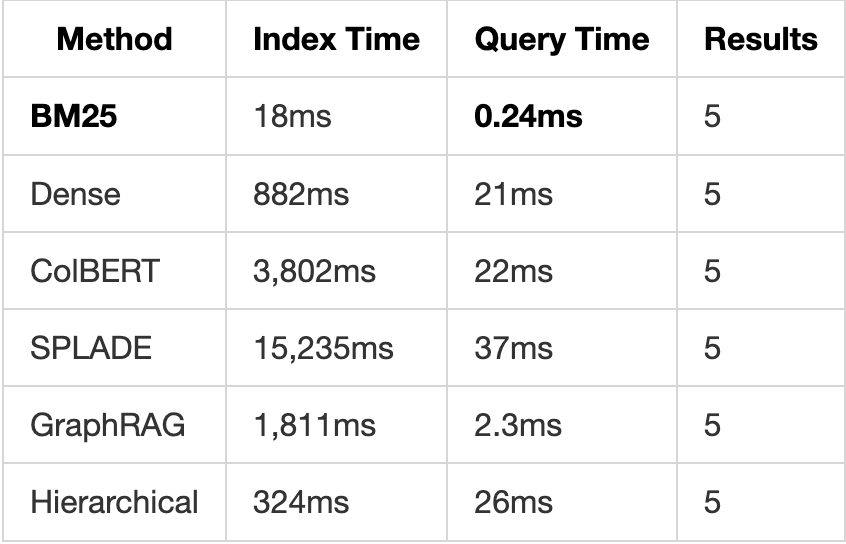
- Index time (200 docs): 882ms
- Query time: 21ms
- Retrieval quality: High for semantic queries
2. SPLADE (Sparse + Learned)
What it is: Learned sparse representations combining keyword and semantic matching.
Best for: When you need both exact matches and semantic understanding.
How it works:
Query: "python list comprehension"
        ↓ SPLADE encoding
Sparse vector with learned term weights:
{
    "python": 2.3,
    "list": 1.8,
    "comprehension": 2.1,
    "loop": 0.4,      # Expanded term
    "iterate": 0.3    # Expanded term
}
Usage:
from polyrag.retrievers import SPLADERetriever

retriever = SPLADERetriever()
retriever.index(documents)
results = retriever.retrieve("python list comprehension")
Test Results:
- Index time (200 docs): 15,235ms
- Query time: 37ms
- Retrieval quality: Excellent for technical queries
3. ColBERT (Late Interaction)
What it is: Token-level matching with contextualized embeddings.
Best for: Precise matching where word order and context matter.
How it works:
Query: "apple fruit nutrition"
        ↓ token embeddings
["apple"] → [0.2, 0.8, ...]
["fruit"] → [0.5, 0.3, ...]
["nutrition"] → [0.7, 0.4, ...]
        ↓ MaxSim matching
Each query token finds best matching document token
Usage:
from polyrag.retrievers import ColBERTRetriever

retriever = ColBERTRetriever()
retriever.index(documents)
results = retriever.retrieve("apple fruit nutrition")
Test Results:
- Index time (200 docs): 3,802ms
- Query time: 22ms
- Retrieval quality: Very high precision
4. BM25 (Keyword Search)
What it is: Traditional keyword matching with TF-IDF weighting.
Best for: Exact keyword matches, document IDs, specific terms.
How it works:
Query: "Form A-7 requirements"
        ↓ tokenize
["form", "a-7", "requirements"]
        ↓ BM25 scoring
Score = Σ IDF(term) × TF(term, doc) × (k1 + 1) / (TF + k1 × ...)
Usage:
from polyrag.retrievers import BM25Retriever

retriever = BM25Retriever()
retriever.index(documents)
results = retriever.retrieve("Form A-7 requirements")
Test Results:
- Index time (200 docs): 18ms
- Query time: 0.24ms (fastest!)
- Retrieval quality: Excellent for keyword queries
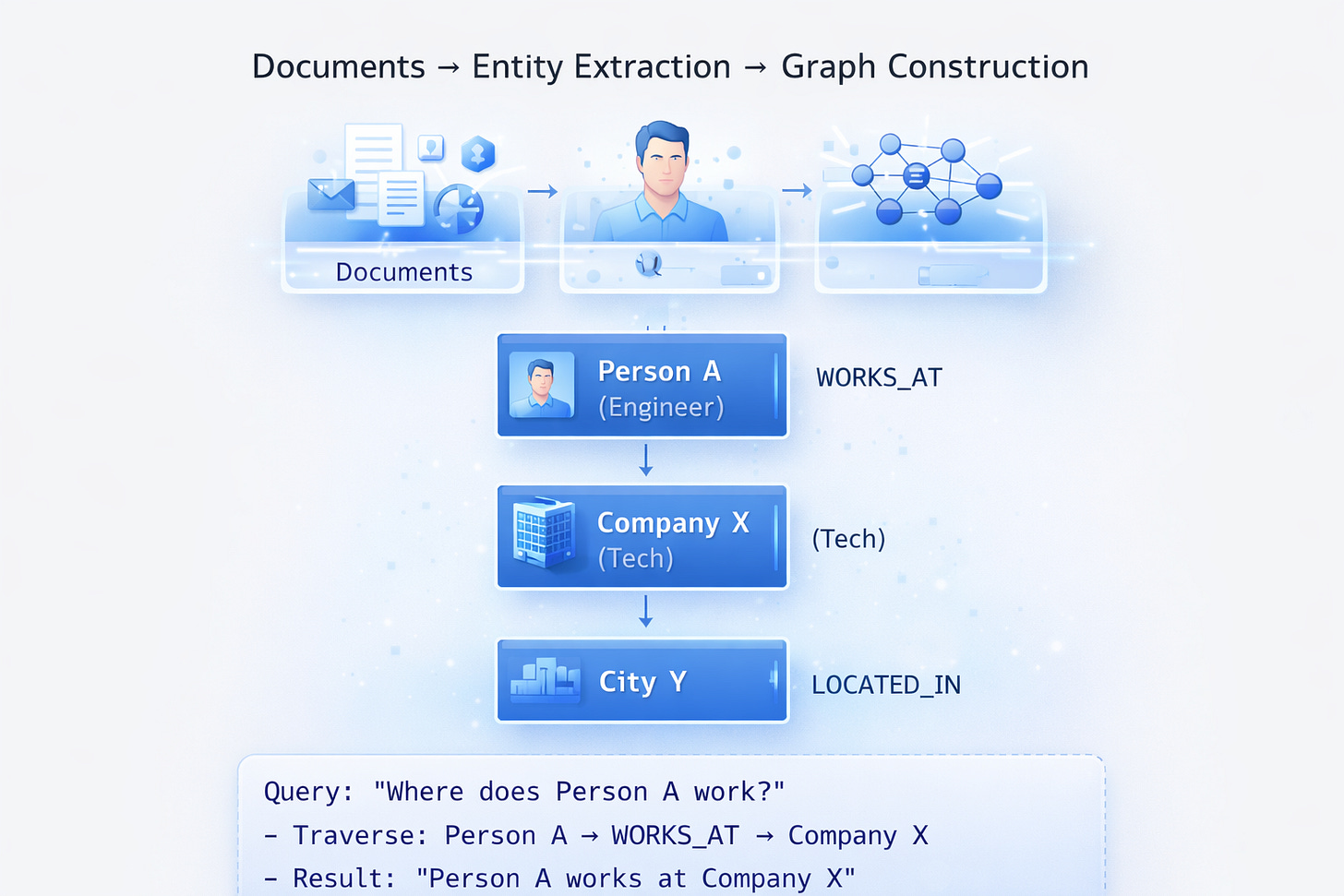
5. GraphRAG (Knowledge Graph)
What it is: Entity extraction + relationship graph + graph traversal.
Best for: “How does X relate to Y?” questions, entity-centric queries.
How it works:
Usage:
from polyrag.graph import GraphRetriever

retriever = GraphRetriever(config={"use_graph_store": True})
retriever.index(documents)
results = retriever.retrieve("How is Person A related to City Y?")
Test Results:
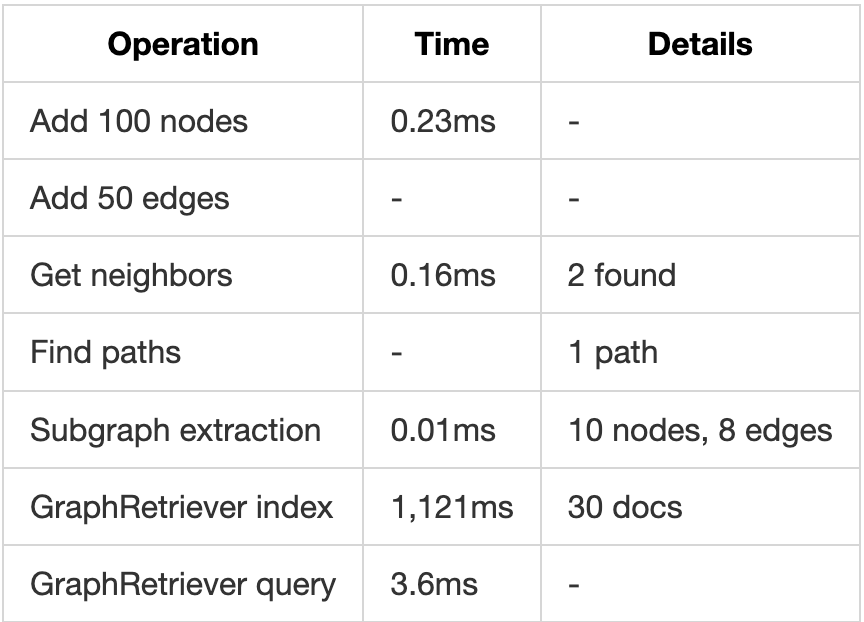
- Index time (30 docs): 1,073ms
- Query time: 3.6ms
- Best for: Relationship queries
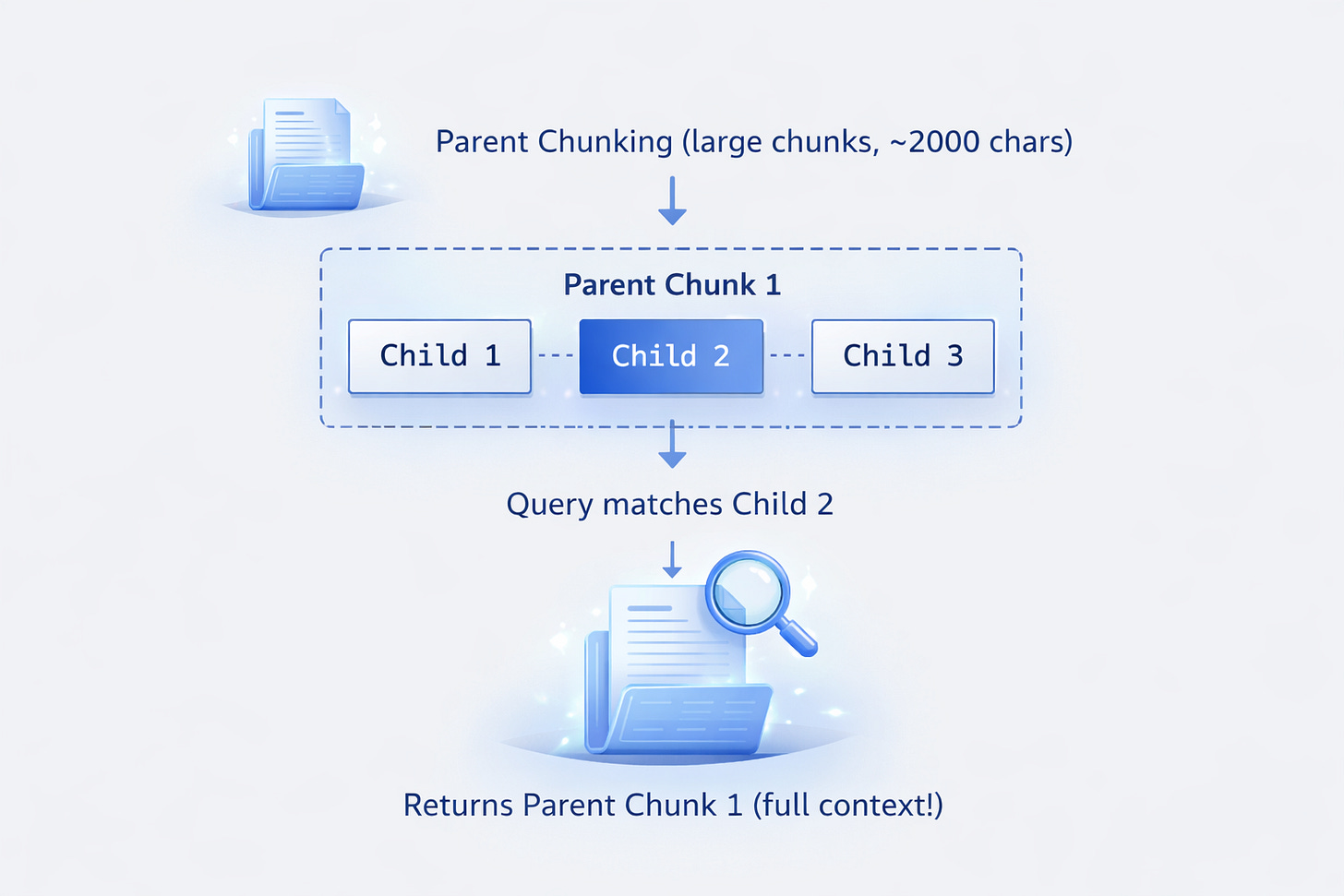
6. Hierarchical RAG
What it is: Parent-child chunk relationships for context preservation.
Best for: Queries needing surrounding context.
How it works:
Usage:
from polyrag.retrievers import create_hierarchical_retriever, DenseRetriever

base = DenseRetriever()
retriever = create_hierarchical_retriever(
    base,
    parent_chunk_size=2000,
    child_chunk_size=400,
    return_parent=True
)
retriever.index(documents)
results = retriever.retrieve("specific detail query")
# Returns parent chunk with full context
Test Results:
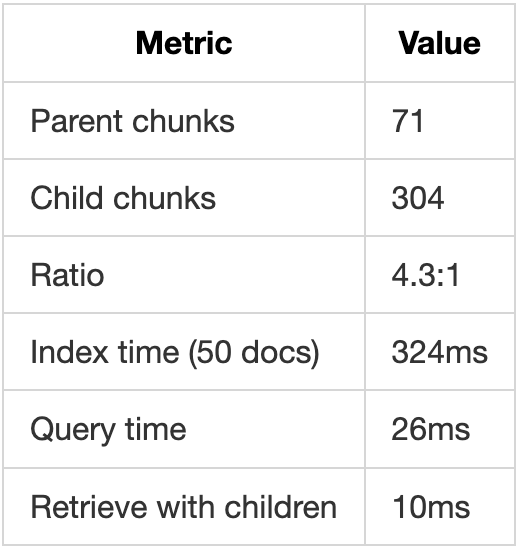
- Parents created: 71
- Children created: 304
- Ratio: 4.3 children per parent
- Query time: 26ms
- Context preservation: Excellent
7. Iterative Methods (LLM-Powered)
Self-Ask
What it is: LLM generates follow-up questions to gather more information.
Original: "What's the capital of the country where Einstein was born?"
    ↓ Self-Ask
Q1: "Where was Einstein born?"
A1: "Germany"
Q2: "What's the capital of Germany?"
A2: "Berlin"
Final: "Berlin"
Decompose
What it is: Breaks complex queries into simpler sub-queries.
Original: "Compare revenue of Company A and B in 2023"
    ↓ Decompose
Q1: "What was Company A's revenue in 2023?"
Q2: "What was Company B's revenue in 2023?"
    ↓ Combine
Final: "Company A: $10M, Company B: $15M. B had 50% higher revenue."
ReAct (Reasoning + Acting)
What it is: Interleaves thinking with retrieval actions.
Query: "Find all products under $50 with 4+ stars"

Thought: I need to find products, filter by price and rating
Action: Search "products price rating"
Observation: Found product list
Thought: Now I need to filter
Action: Filter price < 50 AND rating >= 4
Result: [Product A ($45, 4.5★), Product B ($30, 4.2★)]
Usage:
from polyrag.iterative import SelfAskRetriever, QueryDecompositionRetriever

# Requires LLM provider
llm = get_llm_provider({"provider": "anthropic", "model": "claude-3-haiku"})

retriever = SelfAskRetriever(base_retriever, llm)
results = retriever.retrieve("Complex multi-hop question")
Test Results:
- Self-Ask query time: ~500ms (includes LLM calls)
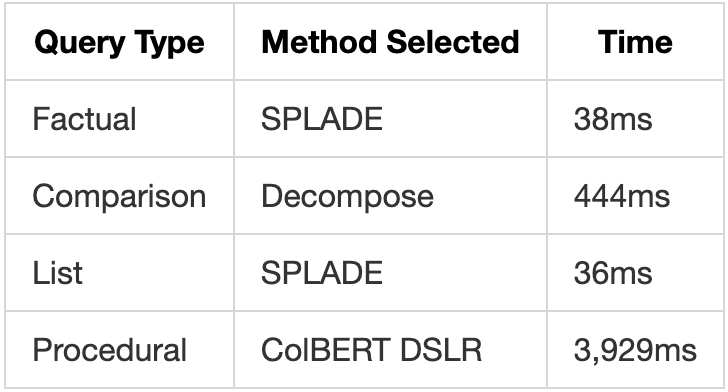
- Decompose query time: ~444ms
- Accuracy: Significantly higher for complex queries
Memory System
The Three Memory Types
PolyRAG implements a cognitive-inspired memory architecture:
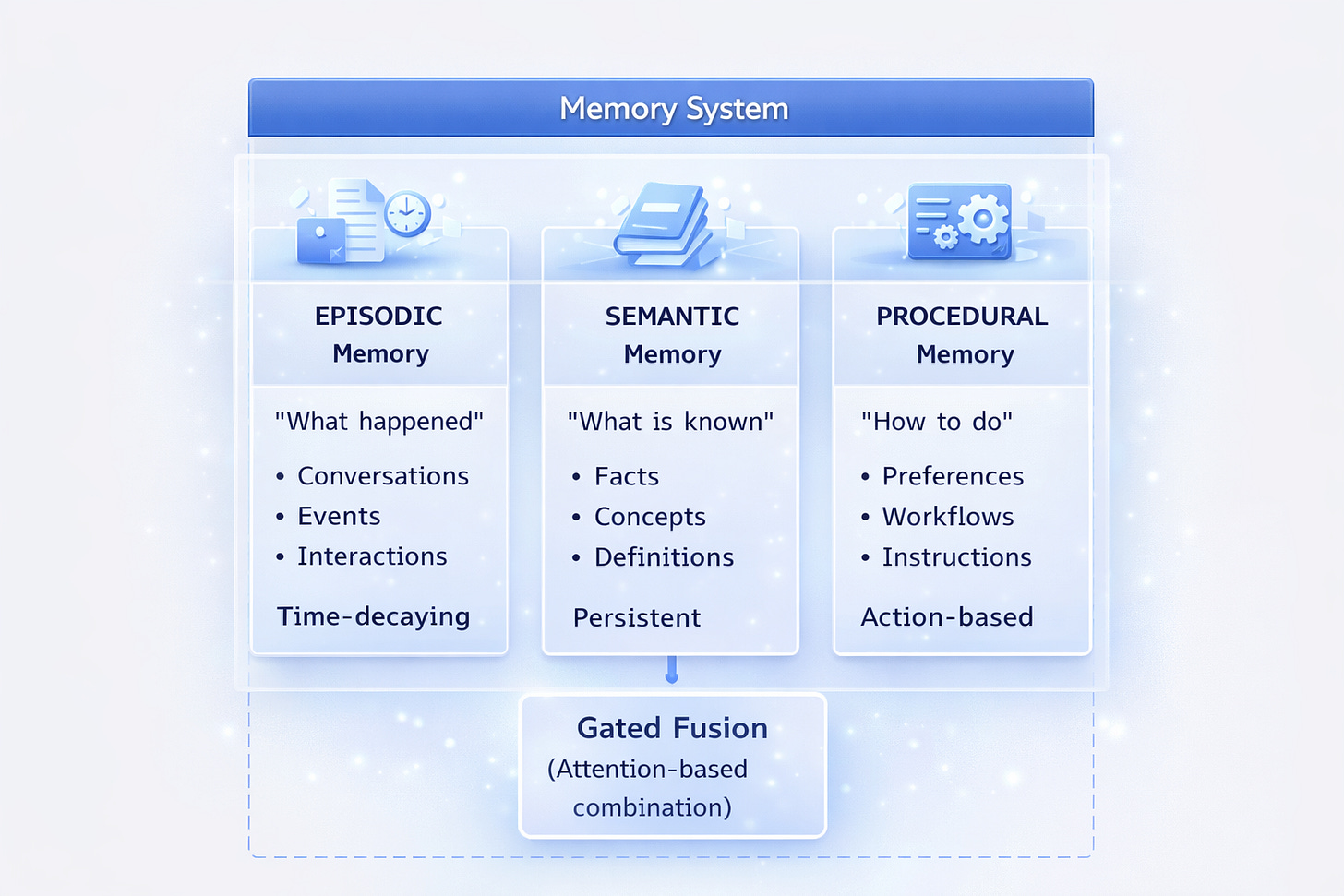
Memory Types Explained
Episodic Memory
Stores specific events and interactions:
memory.add(
    "User asked about Python decorators on Monday",
    memory_type="episodic",
    importance=0.7
)
Semantic Memory
Stores facts and knowledge:
memory.add(
    "User is a senior software engineer",
    memory_type="semantic",
    importance=0.9
)
Procedural Memory
Stores how to do things:
memory.add(
    "Always provide code examples in Python",
    memory_type="procedural",
    importance=0.8
)
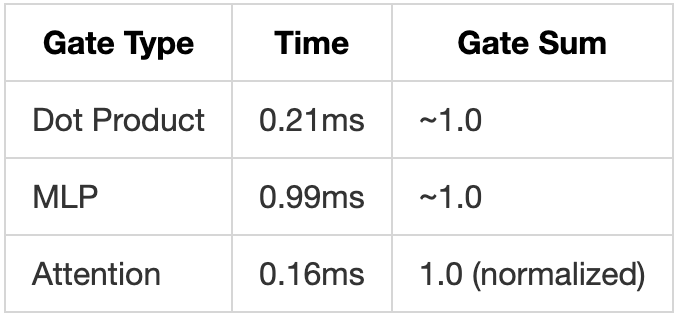
Gated Memory Fusion
When searching memories, PolyRAG uses attention-based gating to weight different memory types:
from polyrag.memory import GatedMemoryFusion
from polyrag.config import GatedFusionConfig

fusion = GatedMemoryFusion(GatedFusionConfig(
    gate_type="attention",  # "dot", "mlp", or "attention"
    temperature=1.0,
    normalize=True
))

# Fuse results from different memory types
fused_results = fusion.fuse(
    query_embedding,
    {
        MemoryType.EPISODIC: episodic_results,
        MemoryType.SEMANTIC: semantic_results,
        MemoryType.PROCEDURAL: procedural_results
    }
)

# Gates show importance of each type for this query
print(fused_results.gates)
# {EPISODIC: 0.3, SEMANTIC: 0.5, PROCEDURAL: 0.2}
Complete Memory Example
from polyrag.memory import MemoryManager

# Initialize for a specific user
memory = MemoryManager(config={
    "user_id": "user_123",
    "auto_extract": False,
    "vector_store": {"type": "faiss"}
})

# Add memories
memory.add("User prefers concise answers", memory_type="procedural", importance=0.8)
memory.add("User is working on a RAG project", memory_type="semantic", importance=0.9)
memory.add("Last session discussed embeddings", memory_type="episodic", importance=0.6)

# Search with fusion
results = memory.search("code examples", top_k=5)
for r in results:
    print(f"[{r.memory.memory_type}] {r.memory.content} (score: {r.relevance_score:.2f})")

# Get statistics
stats = memory.stats()
print(f"Total memories: {stats['total_memories']}")
print(f"By type: {stats['by_type']}")
Test Results:
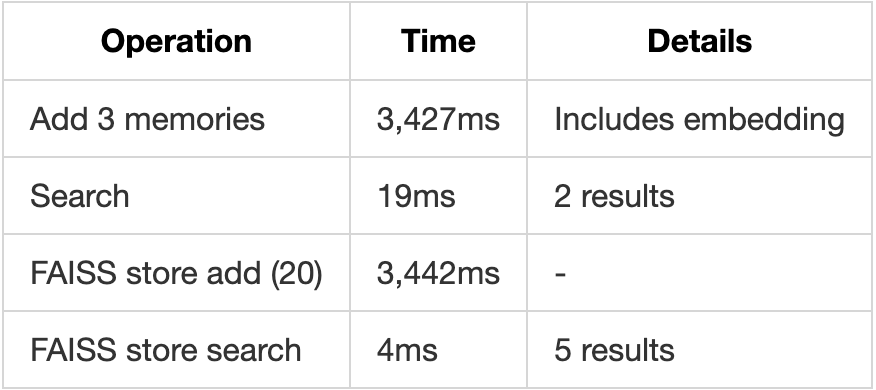
- Memory add time: ~3.4s (includes embedding)
- Memory search time: 19ms
- Gated fusion time: <1ms
Caching System (Engram-Inspired)
The Problem: Repeated Computation
Every embedding computation costs time and (for API providers) money:
Query: "What is machine learning?"
  → Compute embedding: 50-200ms

Same query again:
  → Compute embedding again: 50-200ms (wasted!)
The Solution: N-gram Hash Cache
Inspired by Engram’s pattern-based memory, PolyRAG uses O(1) hash lookup:
Query: "What is machine learning?"
        ↓ N-gram hashing
Hash: "a3f8c2e1d4b5..."
        ↓ Cache lookup
Cache[hash] → Embedding (if exists)
        ↓
Return cached embedding in ~0.08ms (vs 50-200ms)
How N-gram Hashing Works
from polyrag.cache import NgramHasher

hasher = NgramHasher(max_ngram_size=3)

# Text is tokenized and hashed using N-grams
text = "machine learning basics"
# Unigrams: ["machine", "learning", "basics"]
# Bigrams: ["machine learning", "learning basics"]
# Trigrams: ["machine learning basics"]
# All hashed together → unique key

hash_key = hasher.hash(text)
print(hash_key)  # "a3f8c2e1d4b5..."
Cache Usage
from polyrag.cache import NgramCache
from polyrag.config import NgramCacheConfig

# Configure cache
config = NgramCacheConfig(
    backend="memory",      # "memory" or "disk"
    max_size=10000,        # Maximum entries
    ttl_seconds=3600,      # Time-to-live (1 hour)
    max_ngram_size=3,      # N-gram size for hashing
    cache_embeddings=True, # Cache embedding vectors
    cache_results=True     # Cache retrieval results
)

cache = NgramCache(config)

# Manual cache operations
cache.set("key", embedding_vector)
cached = cache.get("key")

# Automatic caching with compute fallback
embedding = cache.get_or_compute(
    "query text",
    compute_fn=embedding_provider.encode
)
# First call: computes and caches
# Subsequent calls: returns cached
Performance Impact
Test Results from 504 Documents:
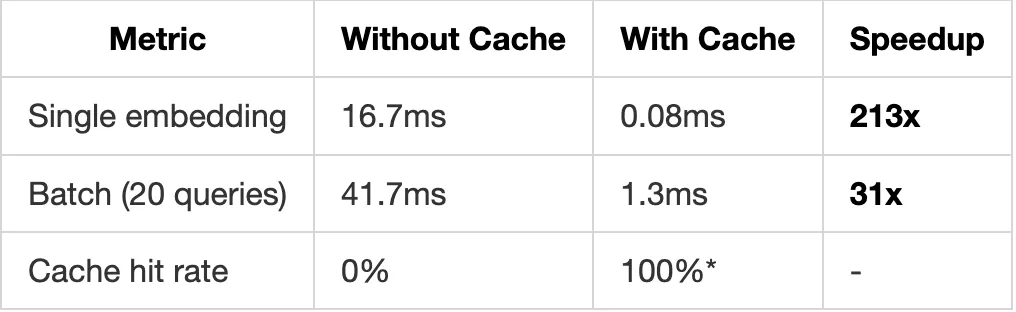
*For repeated queries
Disk-Based Persistence
For production use with persistence:
cache = NgramCache(NgramCacheConfig(
    backend="disk",
    disk_path="/path/to/cache.db",
    max_size=100000
))

# Cache survives restarts
# Uses SQLite for efficient storage
RLM: Recursive Language Models
What is RLM?
RLM (Recursive Language Models) enables PolyRAG to execute code for queries that need computation, not just retrieval.
Traditional RAG:
Query: "What's the total revenue from all Q4 invoices?"
→ Retrieves invoice chunks
→ Returns: "Here are some invoices from Q4..."

PolyRAG with RLM:
Query: "What's the total revenue from all Q4 invoices?"
→ Generates code to extract and sum values
→ Executes code safely
→ Returns: "Total Q4 revenue: $1,234,567"
The RELP + REPL Architecture
RELP (Recursive Explicit Language Program):
Structured programs that LLMs generate with explicit reasoning steps.
REPL (Read-Eval-Print Loop):
Safe execution environment for running RELP programs.
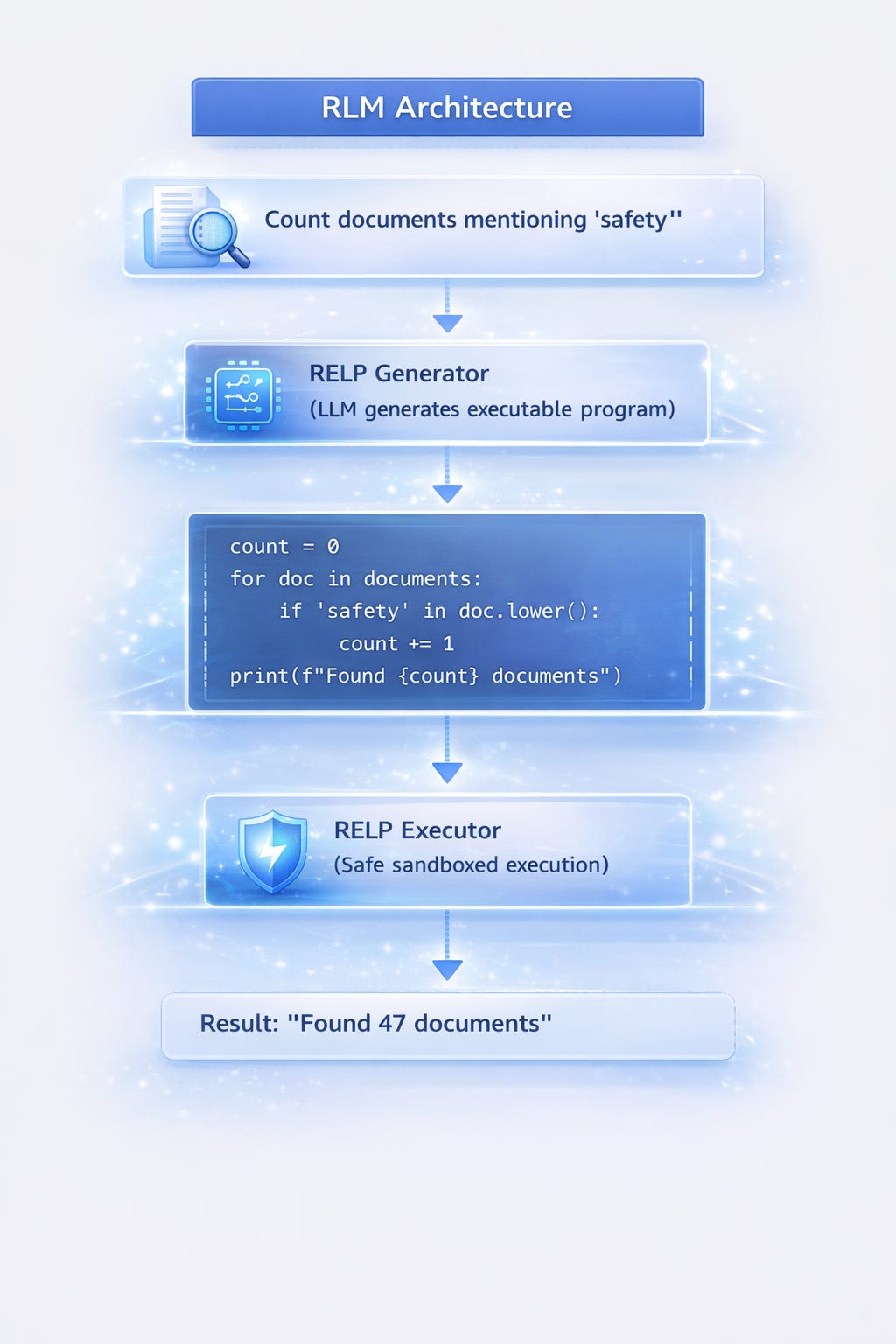
Using RLM REPL
from polyrag.rlm import LocalREPL

# Initialize REPL
repl = LocalREPL()

# Set variables accessible to code
documents = [doc.content for doc in my_documents]
repl.set_variable("documents", documents)

# Execute code
result = repl.execute("""
count = sum(1 for d in documents if 'safety' in d.lower())
print(f"Documents mentioning safety: {count}")
""")

if result.success:
    print(result.output)  # "Documents mentioning safety: 47"
else:
    print(f"Error: {result.error}")
Practical Examples
Example 1: Counting and Filtering
# Find documents with specific criteria
code = """
results = []
for i, doc in enumerate(documents):
    if 'revenue' in doc.lower() and '2023' in doc:
        results.append(i)
print(f"Found {len(results)} matching documents: {results[:5]}")
"""
result = repl.execute(code)
# "Found 12 matching documents: [3, 15, 22, 31, 45]"
Example 2: Aggregation
# Calculate statistics
code = """
word_counts = [len(doc.split()) for doc in documents]
total = sum(word_counts)
avg = total / len(word_counts)
max_words = max(word_counts)
print(f"Total words: {total}, Avg: {avg:.1f}, Max: {max_words}")
"""
result = repl.execute(code)
# "Total words: 125000, Avg: 250.0, Max: 1523"
Example 3: Pattern Extraction
# Extract patterns using regex
code = """
import re
emails = []
for doc in documents:
    found = re.findall(r'[\\w.-]+@[\\w.-]+', doc)
    emails.extend(found)
unique_emails = list(set(emails))
print(f"Found {len(unique_emails)} unique emails")
"""
result = repl.execute(code)
# "Found 34 unique emails"
Sub-LLM Manager
For complex tasks, RLM can invoke smaller LLMs:
from polyrag.rlm import SubLLMManager

manager = SubLLMManager(config={
    "provider": "anthropic",
    "model": "claude-3-haiku-20240307"
})

# Use Sub-LLM for specific tasks
response = manager.call("Summarize this in one sentence: " + long_text)
Test Results:
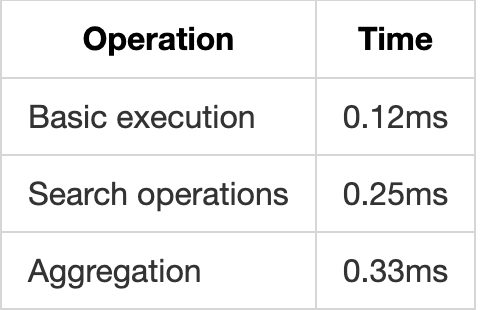
- Basic execution: 0.12ms
- Search operations: 0.25ms
- Aggregation: 0.33ms
- With Sub-LLM: ~500ms (includes API call)
Benchmark Results
Test Configuration
Documents: 504 (SQuAD + HotpotQA from Hugging Face)
Queries: 926 test queries
Hardware: Apple Silicon (M-series)
Date: January 2026
Comprehensive Results
Data Loading
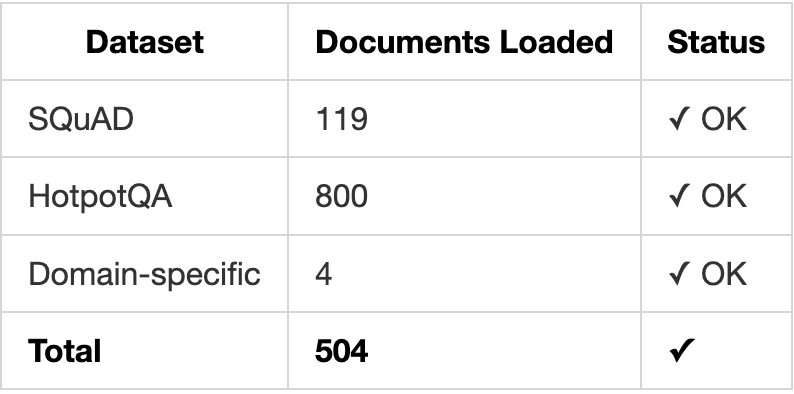
N-gram Cache Performance
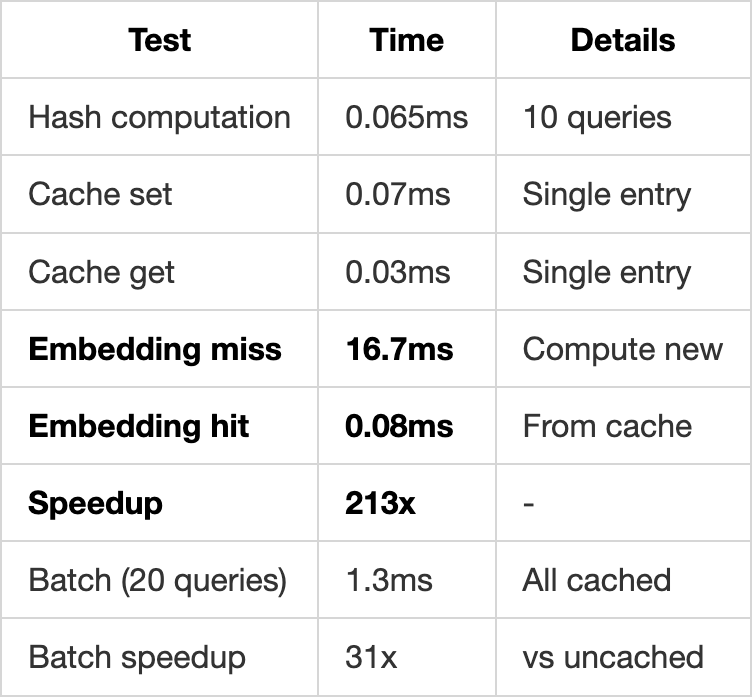
Gated Memory Fusion
Hierarchical RAG
Graph Store
Retrieval Methods Comparison
Adaptive Pipeline Query Routing
Memory Module
RLM REPL
Summary Statistics
Configuration Reference
Complete Configuration Schema
config = {
    # =================================================================
    # Embedding Configuration
    # =================================================================
    "embedding": {
        "provider": "local",  # "local", "openai", "cohere"
        "model": "sentence-transformers/all-MiniLM-L6-v2",
        # For OpenAI:
        # "provider": "openai",
        # "model": "text-embedding-3-small",
        # "api_key": "sk-..."  # or use OPENAI_API_KEY env var
    },

    # =================================================================
    # Chunking Configuration
    # =================================================================
    "chunking": {
        "strategy": "recursive",  # "fixed", "recursive", "semantic"
        "chunk_size": 500,
        "chunk_overlap": 50,
        "min_chunk_size": 100,
    },

    # =================================================================
    # Hierarchical Chunking
    # =================================================================
    "hierarchical_chunking": {
        "parent_chunk_size": 2000,
        "parent_chunk_overlap": 200,
        "child_chunk_size": 400,
        "child_chunk_overlap": 50,
        "min_parent_size": 200,
        "min_child_size": 50,
    },

    # =================================================================
    # Vector Store Configuration
    # =================================================================
    "vector_store": {
        "type": "faiss",  # "faiss", "memory", "qdrant"
        # For Qdrant:
        # "type": "qdrant",
        # "url": "http://localhost:6333",
        # "collection_name": "polyrag"
    },

    # =================================================================
    # Cache Configuration (Engram-Inspired)
    # =================================================================
    "cache": {
        "enabled": True,
        "backend": "memory",  # "memory", "disk"
        "max_size": 10000,
        "ttl_seconds": 3600,
        "max_ngram_size": 3,
        "cache_embeddings": True,
        "cache_results": True,
        # For disk backend:
        # "disk_path": "/path/to/cache.db"
    },

    # =================================================================
    # Gated Memory Fusion
    # =================================================================
    "gated_fusion": {
        "enabled": True,
        "gate_type": "attention",  # "dot", "mlp", "attention"
        "temperature": 1.0,
        "normalize": True,
        "min_gate": 0.1,
    },

    # =================================================================
    # Memory Configuration
    # =================================================================
    "memory": {
        "user_id": "default_user",
        "auto_extract": False,
        "vector_store": {"type": "faiss"},
        "embedding": {"provider": "local"},
    },

    # =================================================================
    # Graph Store Configuration
    # =================================================================
    "graph_store": {
        "backend": "local",  # "local", "neo4j"
        "persist_path": "/path/to/graph.json",
        # For Neo4j:
        # "backend": "neo4j",
        # "uri": "bolt://localhost:7687",
        # "username": "neo4j",
        # "password": "password"
    },

    # =================================================================
    # Retriever Configuration
    # =================================================================
    "retriever": {
        "default_method": "dense",
        "top_k": 10,

        # Method-specific configs
        "dense": {
            "embedding_model": "sentence-transformers/all-MiniLM-L6-v2"
        },
        "splade": {
            "model": "naver/splade-cocondenser-ensembledistil"
        },
        "colbert": {
            "model": "colbert-ir/colbertv2.0"
        },
        "bm25": {
            "k1": 1.5,
            "b": 0.75
        },
        "hierarchical": {
            "return_parent": True,
            "merge_strategy": "max",  # "max", "avg", "sum"
            "include_child_scores": True
        }
    },

    # =================================================================
    # Adaptive Pipeline Configuration
    # =================================================================
    "adaptive": {
        "enable_routing": True,
        "query_analyser": {
            "complexity_threshold": 0.7,
        },
        "method_weights": {
            "dense": 1.0,
            "splade": 1.0,
            "colbert": 1.0,
            "bm25": 0.8,
            "graph": 0.9,
        }
    },

    # =================================================================
    # LLM Configuration (for iterative methods)
    # =================================================================
    "llm": {
        "provider": "anthropic",  # "openai", "anthropic", "openrouter"
        "model": "claude-3-haiku-20240307",
        # "api_key": "..."  # or use env var
        # For OpenRouter:
        # "provider": "openai",
        # "model": "anthropic/claude-3-haiku",
        # "base_url": "https://openrouter.ai/api/v1",
        # "api_key": "..."  # OPENROUTER_API_KEY
    },

    # =================================================================
    # RLM Configuration
    # =================================================================
    "rlm": {
        "enable_repl": True,
        "timeout_seconds": 30,
        "max_iterations": 10,
        "sub_llm": {
            "provider": "anthropic",
            "model": "claude-3-haiku-20240307"
        }
    }
}
Environment Variables
# API Keys
export OPENAI_API_KEY="sk-..."
export ANTHROPIC_API_KEY="sk-ant-..."
export OPENROUTER_API_KEY="sk-or-..."
export COHERE_API_KEY="..."

# Qdrant (if using)
export QDRANT_URL="http://localhost:6333"
export QDRANT_API_KEY="..."

# Neo4j (if using)
export NEO4J_URI="bolt://localhost:7687"
export NEO4J_USERNAME="neo4j"
export NEO4J_PASSWORD="..."
Preset Configurations
PolyRAG includes presets for common use cases:
from polyrag.config import load_preset

# Fast and simple
config = load_preset("fast")

# Balanced (recommended for most cases)
config = load_preset("balanced")

# Maximum accuracy
config = load_preset("accurate")

# Memory-optimized (for large document sets)
config = load_preset("memory_optimized")
Quick Start Guide
Installation
pip install polyrag

# Or with all optional dependencies
pip install polyrag[all]

# For specific features
pip install polyrag[qdrant]    # Qdrant vector store
pip install polyrag[neo4j]     # Neo4j graph store
pip install polyrag[openai]    # OpenAI embeddings
Basic Usage
from polyrag import AdaptivePipeline, Document

# 1. Create pipeline
pipeline = AdaptivePipeline()

# 2. Prepare documents
documents = [
    Document(
        content="Your document text here...",
        document_id="doc1",
        metadata={"source": "manual"}
    ),
    # Add more documents...
]

# 3. Index
pipeline.index(documents)

# 4. Query
result = pipeline.query("Your question here?")

# 5. Use results
for chunk in result.scored_chunks:
    print(f"Score: {chunk.score:.2f}")
    print(f"Content: {chunk.chunk.content[:200]}...")
    print()
With Memory
from polyrag import AdaptivePipeline, Document
from polyrag.memory import MemoryManager

# Setup
pipeline = AdaptivePipeline()
memory = MemoryManager(user_id="user_123")

# Index documents
pipeline.index(documents)

# Add user preferences to memory
memory.add("User prefers detailed explanations", memory_type="procedural")
memory.add("User is expert in Python", memory_type="semantic")

# Query with memory context
query = "How do I implement caching?"

# Get relevant memories
memories = memory.search(query, top_k=3)
memory_context = "\n".join([m.memory.content for m in memories])

# Get document results
result = pipeline.query(query)

# Combine for LLM
context = f"""
User Preferences:
{memory_context}

Relevant Documents:
{result.scored_chunks[0].chunk.content}
"""

# Use with your LLM...
With Hierarchical RAG
from polyrag.retrievers import create_hierarchical_retriever, DenseRetriever
from polyrag import Document

# Create hierarchical retriever
base = DenseRetriever()
retriever = create_hierarchical_retriever(
    base,
    parent_chunk_size=2000,  # Large context chunks
    child_chunk_size=400,    # Small matching chunks
    return_parent=True       # Return full context
)

# Index
retriever.index(documents)

# Query - returns parent chunks with full context
result = retriever.retrieve("specific detail query")

for chunk in result.scored_chunks:
    # chunk.content is the PARENT chunk (full context)
    print(f"Context: {chunk.chunk.content}")
With Caching
from polyrag.cache import NgramCache
from polyrag.embeddings import LocalEmbeddingProvider

# Setup cache
cache = NgramCache({"backend": "memory", "max_size": 10000})
provider = LocalEmbeddingProvider()

# Use cached embeddings
def get_embedding(text):
    return cache.get_or_compute(text, provider.encode)

# First call: computes (slow)
emb1 = get_embedding("What is machine learning?")

# Second call: cached (213x faster!)
emb2 = get_embedding("What is machine learning?")

# Check stats
print(cache.stats())
Full Production Setup
from polyrag import AdaptivePipeline, Document
from polyrag.memory import MemoryManager
from polyrag.cache import NgramCache
from polyrag.graph import GraphRetriever, get_graph_store

# Configuration
config = {
    "embedding": {
        "provider": "local",
        "model": "sentence-transformers/all-mpnet-base-v2"
    },
    "cache": {
        "enabled": True,
        "backend": "disk",
        "disk_path": "./cache/polyrag.db",
        "max_size": 100000
    },
    "vector_store": {
        "type": "faiss"
    },
    "hierarchical_chunking": {
        "parent_chunk_size": 2000,
        "child_chunk_size": 400
    }
}

# Initialize components
pipeline = AdaptivePipeline(config)
memory = MemoryManager(user_id="production_user")
graph_store = get_graph_store({"backend": "local", "persist_path": "./data/graph.json"})
cache = NgramCache(config["cache"])

# Load and index documents
documents = load_your_documents()  # Your document loading logic
pipeline.index(documents)

# Production query handler
def handle_query(user_id: str, query: str):
    # 1. Check cache for similar queries
    cache_key = cache.hasher.hash(query)
    cached = cache.get(cache_key)
    if cached:
        return cached.value

    # 2. Get user memories
    memories = memory.search(query, top_k=3)

    # 3. Query pipeline (auto-routes to best method)
    result = pipeline.query(query, top_k=10)

    # 4. Cache result
    cache.set(cache_key, result)

    # 5. Return
    return {
        "method_used": result.retrieval_method,
        "results": [
            {
                "content": c.chunk.content,
                "score": c.score,
                "document_id": c.chunk.document_id
            }
            for c in result.scored_chunks
        ],
        "memories": [m.memory.content for m in memories]
    }

# Use
response = handle_query("user_123", "What is the refund policy?")
Conclusion
PolyRAG represents a comprehensive approach to building production-ready intelligent information systems. This is not just RAG it’s a complete framework combining:
- Multi-Method Retrieval (10+ methods with adaptive routing)
- Persistent Memory (Episodic, Semantic, Procedural across sessions)
- Intelligent Caching (O(1) lookup with 213x speedup)
- Knowledge Graphs (Entity relationships and traversal)
- Code Execution (RLM REPL for computation)
- Hierarchical Context (Parent-child chunk relationships)
- Pluggable Architecture (Extend with your own logic)
You can build intelligent information systems that actually work in production.
Key Takeaways
- It’s not just retrieval - Memory, reasoning, and relationships are equally important
- No single method works for all queries - Use adaptive routing
- Context matters - Use hierarchical chunking
- Users expect memory - Implement persistent memory across sessions
- Performance compounds - Cache aggressively with N-gram hashing
- Some queries need reasoning - Use RLM when retrieval isn’t enough
- Build to extend - PolyRAG’s pluggable architecture welcomes contributions
Contributing
PolyRAG is open source. We welcome contributions:
- New retrieval methods
- Custom routers for specific domains
- Vector store integrations
- Memory backends
- Bug fixes and documentation
See the detailed feature documentation for extension points.
Connect:
- Website: phronetic.ai
- LinkedIn: supreeth-ravi
- Email: supreeth.ravi
PolyRAG: Many Methods. One System. Fully Extensible. Production Ready.